
Tax Toggle for WooCommerce
Let your shop visitors choose whether prices are shown with or without VAT — fully customizable, and placeable anywhere using shortcodes, widgets, or PHP.
One store, two kinds of customers.
Businesses compare prices excluding VAT. Consumers expect the final price including VAT. WooCommerce shows one or the other — Tax Toggle lets every visitor choose.
B2B buyers
See prices excluding VAT, the way they budget, compare and invoice.
Private customers
See the price they actually pay, with VAT included.
One catalogue
No separate B2B shop, duplicate products or extra price lists to maintain.
Three things – done well
Toggle tax display
Let visitors switch between prices with and without VAT — instantly, without reloading the page.
12,00 kr. incl. VAT 9,60 kr. excl. VAT
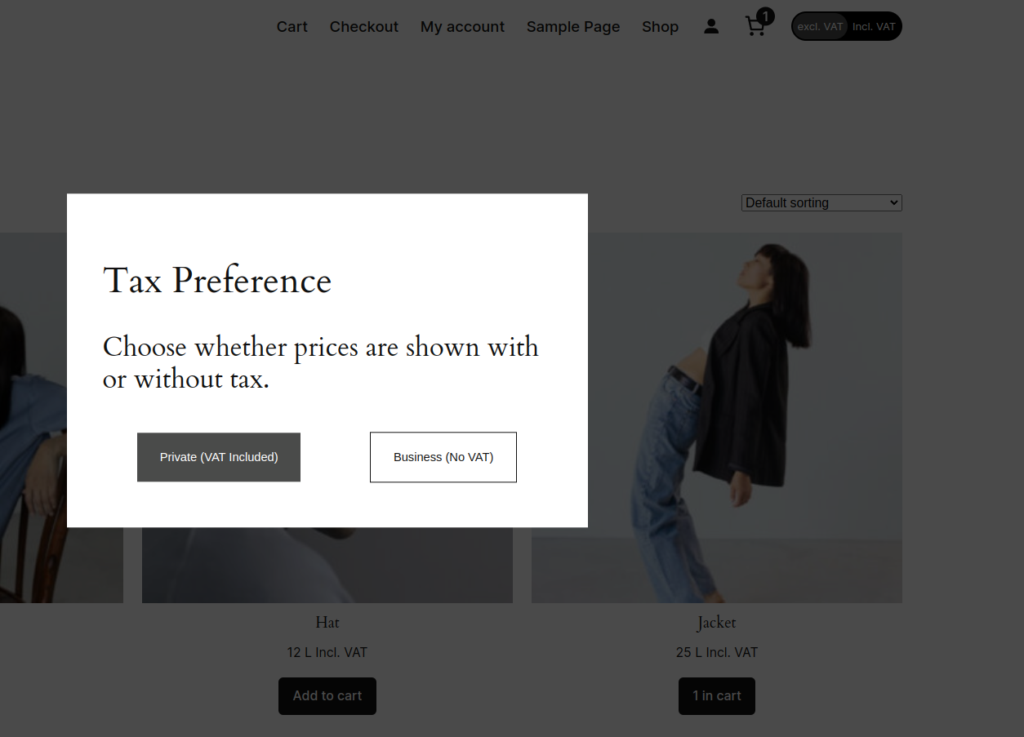
Popup on first visit
A clean popup asks visitors their preference on first visit — and remembers their choice for next time.
12,00 kr. incl. VAT 9,60 kr. excl. VAT
How would you like to see prices?
Business customers usually see prices excl. VAT.
Fully customizable
Change colors, labels, and position. Place it anywhere via shortcode, widget, or PHP — fits any theme.
Ready to try it?
Download Tax Toggle for WooCommerce for free and let your customers choose how they see prices.
Other features
- Completely customizable: All text and colors can be customized by shop owners, regardless of how you choose to display the toggle.
- First-visit popup: Display a customized popup to visitors, allowing users to choose their tax preference before entering the shop.
- Dynamic price updates: Dynamically switches tax for product prices without refreshing the page.
- AJAX compatibility: Works seamlessly alongside AJAX-based product search and filter plugins.
- Page builder integration: Dynamic widget that integrates with popular page builders, including Oxygen, Bricks and Elementor.
- Flexible placement: Display the toggle through blocks, shortcodes, widgets or PHP code.
- Performance optimized: Developed with minimal JavaScript and CSS, ensuring minimal impact on site performance.
User experience
Setting a tax preference is as simple as clicking a toggle button, which site owners can place anywhere on the page. A user’s chosen tax preference is saved, and navigating to new pages does not reset the preference.
The plugin also offers a popup option that allows users to choose their preferred tax option when first visiting your site.
Compatibility
Important note: This plugin is not compatible with plugins that alter WooCommerce’s default price display functionality.
Tested and fully compatible with:
- WordPress 6.+
- WooCommerce 9.+
- PHP 8.0+
Usage
The tax toggle can be placed anywhere in your store using one of these methods:
Block
Add the Tax Toggle block in the block editor and set its labels, background, active and text colors per block.
Dynamic widget
Enables placement of multiple tax toggles on your page, with individual styling options for each toggle.
Shortcode
Use the shortcode below to insert the tax toggle. Text and style can be modified from the plugin settings.
[tax-toggle]
PHP implementation
Use PHP by either:
tax_toggle_tax_shortcode()
or
echo do_shortcode('[tax-toggle]');
Text and style can be modified from the plugin settings.
Configuration guide
Widget settings
| Setting | Description |
|---|---|
| Excl. VAT button text | Text displayed on the Excl. VAT button |
| Incl. VAT button text | Text displayed on the Incl. VAT button |
| Toggle background color | Background color for the tax toggle |
| Active toggle element color | Color for the active toggle element |
| Toggle text color | Color of the text in the tax toggle |
Label settings
| Setting | Description |
|---|---|
| Tax included label | Text shown next to prices with tax (e.g. ‘incl. VAT’) |
| Tax excluded label | Text shown next to prices without tax (e.g. ‘excl. VAT’) |
| Zero tax label | Text displayed for tax-exempt products, or when no tax rate is configured |
| Show tax suffixes in cart | Enable/disable tax suffixes in cart prices and subtotal |
Variable product settings
| Setting | Description |
|---|---|
| Variable price prefix | Prefix for variable product prices (e.g. ‘From:’) |
Popup settings
| Setting | Description |
|---|---|
| Enable popup | Toggle popup functionality |
| Popup background color | Background color selection |
| With tax button color | Color for the with-tax button |
| With tax button text color | Text color for the with-tax button |
| Without tax button color | Color for the without-tax button |
| Without tax button text color | Text color for the without-tax button |
| Popup header | Header text for the popup |
| Popup description | Explanatory text for the tax selection |
| Business button text | Text for the business customer button |
| Private button text | Text for the private customer button |
Installation guide
-
Download the plugin
- Download the .ZIP file of “Clypper’s Tax Toggle for WooCommerce”
-
Upload and activate
- Log in to the WordPress admin dashboard
- Navigate to Plugins → Add New → Upload Plugin
- Choose the downloaded .ZIP file
- Click Install Now
- Activate the plugin
-
Enable tax calculations
- Go to WooCommerce → Settings → General
- Enable “Enable tax rates and calculations”
-
Set default tax rate
- Go to WooCommerce → Settings → Tax → Standard rates
- Configure tax rates according to your requirements
-
Configure plugin settings
- Visit the plugin settings page
- Customize colors, texts and features to match your store’s design
Frequently asked questions
Is Tax Toggle for WooCommerce free?
Yes. You can download the plugin for free and use it in your store.
Does it work with my theme and page builder?
Yes. You can place the toggle with a block, a shortcode, a widget or PHP, and it includes a dynamic widget for Oxygen, Bricks and Elementor.
Is the visitor’s choice remembered?
Yes. The chosen tax preference is saved, so it doesn’t reset when the visitor moves to another page.
Will it slow down my store?
No. The plugin is built with minimal JavaScript and CSS to keep the impact on performance low.
Does it work with AJAX product filters and search?
Yes. It works alongside AJAX-based product search and filter plugins.
What do I need to run it?
WordPress 6+, WooCommerce 9+ and PHP 8.0+, with tax rates and calculations enabled in WooCommerce.
Are there plugins it doesn’t work with?
It isn’t compatible with plugins that change WooCommerce’s default price display.
Give every customer the right price.
Tax Toggle for WooCommerce is free. Download it, install it and let your visitors choose.