
In short: APCu came out on top across every metric, delivering a 23% throughput increase and 18% latency reduction at 50 concurrent users. Docket Cache performed remarkably close behind. Redis, despite being the industry standard, only managed a 4.4% throughput improvement. See the full results.
WordPress is an incredible blogging engine, and comes with a ton of great extensions that allow you to mold WordPress into anything and everything that your heart desires. Since plugins have to conform to WordPress’ existing database schema and access patterns, the database oftentimes becomes a bottleneck when it comes to optimising the scalability and performance of the platform. This is especially true when it comes to WooCommerce stores.
Just enabling the plugin itself can double the loading time of your front page, and god forbid that you install a couple of WooCommerce plugins on top.
When optimising stores, one of our first tools to reach for is the object cache. It caches database calls, and the breadth and ingenuity of the methods in which different plugins do it is really interesting. The classic method is to wire up WordPress to Redis, and then you are done. But what do you do if you are on a server with no Redis, or if you are a Kinsta customer, where the Redis add-on is $100/site per month?1
Well, the alternative object cache plugin space opens up an entirely new rabbit hole. These implementations range from storing objects in memory using good old APCu, a purpose-built SQLite database or PHP files.
In this article we will benchmark a range of very different object cache implementations, and see how they stack up against each other. We will be benchmarking the following plugins: SQLite Object Cache, atec Cache APCu, Redis Object Cache, and Docket Cache.
Benchmark
The experiment is designed to stress-test a WordPress installation with varying degrees of simulated concurrent users.
A K6 script is run multiple times, varying the number of VUs (Virtual Users). The benchmark is run 3 times for each degree of VUs, and the median of these runs is used as the result.
The benchmark tests with 5, 10, 25, 50, 100, and 200 VUs. The test continuously failed at 100 VUs and up, since the server began dropping requests at this volume.
WordPress setup
The experiment uses WordPress 7.0.0 and WooCommerce 10.7, with Nginx + PHP-FPM with 5 workers running PHP 8.3, all running in Docker containers.
All pages are served uncached. Only a default installation of WooCommerce with the 9 default placeholder products is running alongside the plugin under test.
Server
All benchmarks were conducted on a Linux server running Ubuntu Server 26.04 LTS with an AMD Ryzen 3 PRO 4350G (4 cores / 8 threads) with 16 GB DDR4 memory and NVMe SSD storage.
Modern computers are fast. Really fast. They can do millions of computations each second, and these computations are used to read data from disk, process it into something useful, like the HTML for a website, and then display it to the user (in the case of a website, transmit it to the user through the internet). Singular computations are done in nanoseconds, but when you chain them together things add up. On top of that, if you then calculate the same thing over and over, then it is MUCH faster to just save the result somewhere, and then use the saved result in the future.
The place where you save your result is a cache. Caches exist everywhere in computer systems, all the way from the CPU to the web server serving this web page, and they massively speed up the computations being done wherever they are present.
Object caches can technically be used to store many types of data, but when it comes to WordPress and WooCommerce and this article, the important function of an object cache is to store things retrieved from the database. This helps us save very expensive database calls, which often account for a large majority of the page-generation time for stores.
WordPress Object cache
An object cache interface is built into WordPress by the developers, and it wires all database calls through its object cache layer. By default no object cache is present, and all calls through the layer go straight to the database. In this case, features like menu caching, transients and sessions are also stored in the database. In WordPress the object cache is managed through an interface that any plugin can implement. Plugins just replace the object-cache.php file with their implementation of an object cache, and then WordPress handles the rest.
Redis Object Cache
Redis is the industry standard for object caching in general, and is the implementation that most hosting providers offer. It is an in-memory data store that runs in a separate application. This means that data cached with Redis survives requests, and can be shared across many PHP workers, contrary to APCu.
A shared cache like this comes at a cost, and every cache read and write requires communicating with another process, either over TCP or Unix sockets, adding network overhead to the requests. This can be mitigated by running Redis on the same machine that serves WordPress, but network latency cannot be entirely eliminated.
atec Cache APCu
APCu (APC User Cache) is the modern replacement for APC (Alternative PHP Cache). APC caches PHP bytecode and provides a shared in-memory cache for user data. After opcode caching became part of PHP core with PHP 5.5 and the Zend OPcache, APCu was released. APCu is a version of APC that ships without bytecode caching, which leaves us with its shared user cache.2
atec Cache APCu is a drop-in implementation of APCu for WordPress which implements both an object cache and a page cache. In this experiment we will only be using the object cache. atec claims to be faster than Redis, with a claimed 16.67% speedup.3
atec has a pro version of the plugin, which has support for PHP arrays as well as serialize() and unserialize().
SQLite Object Cache
SQLite is a file-based database that is often used by applications as easy-to-set-up local storage. Not only is SQLite easy to use, it has very good read performance and has no network overhead. SQLite Object Cache is very special, since it uses an actual database as the datastore for the object cache. This might sound counterintuitive, since we are trying to reduce database interactions, however, SQLite has such good read performance that it actually makes sense. SQLite performs worse with concurrent writes, since it does not support parallel writes. Luckily, caches are read heavy, and as such, we will probably still see this implementation performing well. In short, SQLite Object Cache delegates database operations to a much faster database.
SQLite Object Cache requires that the server environment has the sqlite3 and igbinary extensions. It can also use APCu to accelerate the cache. We are going to test the plugin both with and without APCu enabled.
Docket Cache
Docket offers both an object cache and some of the more “regular” performance optimisations, such as disabling emojis, RSS feeds etc. We are only focusing on the object cache part of Docket. In this regard, Docket implements quite a clever object cache.
Docket literally converts the objects into pure PHP code, and saves them to files on disk.4 Although this adds file I/O to the latency, it still cuts down on database queries. What’s even better is that if you have OPcache enabled, the content of the PHP files is going to be cached in the OPcache, which makes retrieval very fast. This also means that the cache works in most hosting environments, since it does not rely on any external libraries or applications.5
One thing that will be interesting to see with Docket Cache is whether or not it will be limited by the latency of writing and reading files. Reading files is not a fast operation, so logically, storing cache objects as files can seem like an odd solution.
Experiment results
To test the performance of each of the plugins we performed some benchmarks. The experiment methodology can be seen in the methodology section. The experiment results show that all object cache plugins do achieve non-trivial improvements to latency and throughput. If you thought that the good old Redis is the most efficient one, then the results are going to surprise you.
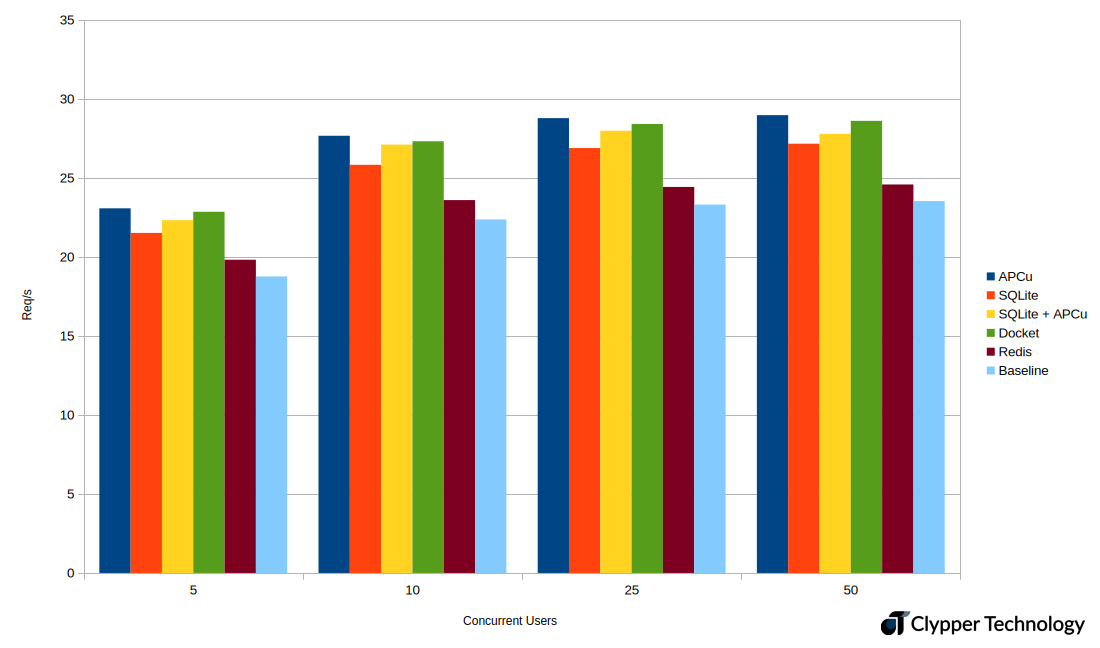
When observing the results from the benchmarks, it is clear that all of the cache implementations increase throughput meaningfully. At 5 concurrent users, we observe 18.76 req/s (requests per second) as the baseline, and 23 req/s for APCu. The other implementations are close to APCu in performance, but Redis is an outlier with only 19.82 req/s.
This pattern repeats at every level of concurrent users, and we get a max throughput of 28.97 req/s at 50 concurrent users.


P90 response times at 5 concurrent users are a bit more nuanced. Here we see a baseline response time of 251 ms, and the fastest response at 216 ms. Here we can see the effects of the storage medium. Redis, an entirely separate application, is the slowest, while Docket, SQLite + APCu, and APCu, which use in-memory storage, are the fastest. It is interesting to see that pure SQLite is in between, but it makes sense that adding database abstractions on top of the file system leads to reduced performance as compared to Docket, which uses both the file system and OPcache.
Speedup at 50 concurrent users
At 50 concurrent users all of the PHP workers are completely saturated, and requests are queuing up waiting to be processed. This should be where object caches shine, since each worker spends less time on a request. Here the differences between different implementations become much clearer, and we are going to use these data points as our measure of speedup.
Throughput
| Req/s | Speedup | |
| Baseline | 23.539 | 0.00% |
| APCu | 28.975 | 23.10% |
| SQLite | 27.166 | 15.41% |
| SQLite + APCu | 27.791 | 18.07% |
| Docket | 28.613 | 21.56% |
| Redis | 24.586 | 4.45% |
Latency
| Latency (ms) | Speedup | |
| Baseline | 2156.157 | 0.00% |
| APCu | 1759.120 | 18.41% |
| SQLite | 1876.854 | 12.95% |
| SQLite + APCu | 1794.735 | 16.76% |
| Docket | 1780.641 | 17.42% |
| Redis | 2085.092 | 3.30% |
When it comes to throughput, we observe an increase in throughput of up to 23%. Here APCu is the clear winner, with Docket taking second place with a speedup of 21.6%. Redis missed the ball, and only provided a speedup of 4.4 percent. We suspect that the network overhead of Redis gives the other plugins an advantage.
Most implementations also significantly reduce latency, with APCu again winning with an 18.4% decrease in response time. Docket scores a close second with 17.4%, with SQLite + APCu taking third place. Here we again see Redis coming in behind, with only a 3.3% reduction in response times.
From these results it seems to be clear that there is a significant performance gain to be had by using one of these cache implementations. Not only can you serve more requests per second, but the latency at which those requests are served also drops significantly.
Conclusion
Object caching is a meaningful optimisation. Every plugin tested delivered meaningful improvements to both throughput and latency, but the winner was not who most people would expect.
APCu came out on top across every metric, delivering a 23% throughput increase and 18% latency reduction at 50 concurrent users. Docket Cache performed remarkably close behind, which is impressive given it relies entirely on the file system and OPcache with no external dependencies. This makes it a great option for shared hosting environments where APCu and Redis are unavailable.
Redis, despite being the industry standard, only managed a 4.4% throughput improvement.
If your server has APCu available, use it. If you are on shared hosting, Docket Cache is a surprisingly capable alternative that only requires PHP. Redis still makes sense, but you should not be disappointed if your hosting environment does not provide access to it. There are many great alternatives to keep your store chugging away happily.