
One quiet afternoon in New Relic, we spotted something that shouldn’t have been there: a category archive page view in a WooCommerce store where about 100 milliseconds went on building JSON. That doesn’t sound like much, but it’s time added to every single view of every category, and JSON encoding should take a fraction of that.
The culprit was a small function in a popular WooCommerce filter plugin. Here’s how we found it, why it was written the way it was, and how a single call to PHP’s own JSON function made it more than a hundred times faster.
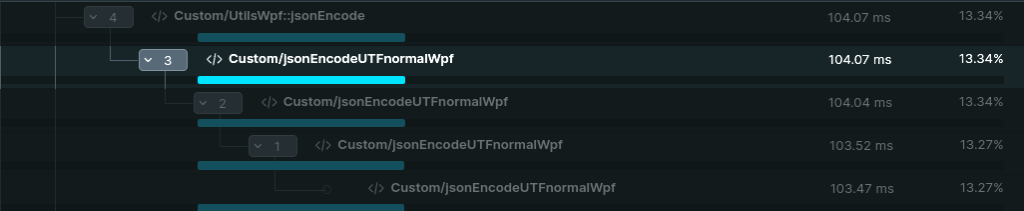
The trace in New Relic
The trace pointed to a function called jsonEncodeUTFnormalWpf(). It called itself over and over, once for every key and every value in the data the plugin passed to the filter on the page, and each call went through its text character by character. It wasn’t one slow operation, but thousands of small ones.
Why the code looked like that
The name gives a clue. “UTFnormal” is about character sets, and home-made JSON functions like this were common in PHP code from the mid-2000s. PHP only got its own JSON function in 2006, and the options that make it usable for text with characters like æ, ø and å, and for data with errors in it, arrived over the following years:
| PHP version | Year | What arrived |
|---|---|---|
| 5.2.0 | 2006 | json_encode() |
| 5.4.0 | 2012 | JSON_UNESCAPED_UNICODE: characters like æ are written directly instead of as \u00e6 |
| 5.5.0 | 2013 | JSON_PARTIAL_OUTPUT_ON_ERROR: one bad value doesn’t make the whole result fail |
| 7.2 | 2017 | JSON_INVALID_UTF8_SUBSTITUTE: invalid characters are replaced instead of stopping the encoding |
If you wanted clean, error-tolerant JSON in 2006 across the servers WordPress ran on, you had to build it yourself. So the function wasn’t badly written. It solved a problem that existed back then, and it had stayed in place for many years after PHP solved it itself.
What the function did
This is how it handled text:
function jsonEncodeUTFnormalWpf($value) {
    if (is_int($value)) {
       return (string) $value;
    } elseif (is_string($value)) {
       // replace special characters
       $value = str_replace(array('\\', '/', '"', "\r", "\n", "\b", "\f", "\t"),
                       array('\\\\', '\/', '\"', '\r', '\n', '\b', '\f', '\t'), $value);
       // character map that is never used
       $convmap = array(0x80, 0xFFFF, 0, 0xFFFF);
       $result = '';
       // rebuild the string, one character at a time
       for ($i = strlen($value) - 1; $i >= 0; $i--) {
          $mb_char = substr($value, $i, 1);
          $result = $mb_char . $result;
       }
       return '"' . $result . '"';
    }
    // ... the rest of the function
For every piece of text, even a short word like “product”, it first ran a replacement of eight different characters. Then it created a character map that was never used, probably left over from an older version. Finally it walked backwards through the text and rebuilt it from the front, one byte at a time with substr(). The result was exactly the same text, but every step created a new string in memory.
Arrays got their own treatment. Before the function could encode an array, it looped through it to find out whether the keys were 0, 1, 2 and so on (a JSON list) or names (a JSON object):
} elseif (is_array($value)) {
       $with_keys = false;
       $n = count($value);
       for ($i = 0, reset($value); $i < $n; $i++, next($value)) {
          if (key($value) !== $i) {
             $with_keys = true;
             break;
          }
       }
Afterwards it looped through the array again and called itself for every key and every value. For an object, the key was also sent through all the text handling above.
Why it got expensive
Each part on its own is cheap. The problem is that they multiply. A filter on a category archive can have many attributes and many values, each with names, counters and settings, and all of it sits in nested arrays. For every level the array is looped through twice, for every key and value there’s a new function call, and for every string a new string is built one byte at a time. Along the way, PHP has to create and clean up a large number of small strings.
That’s work PHP’s built-in json_encode() does in C in a single pass. The old function did the same in PHP, with several passes and lots of intermediate results, and that’s where the 100 milliseconds went.
The fix
Once we understood what the function needed to do, the fix was short:
function jsonEncodeUTFnormalWpf($value) {
    return json_encode($value,
        JSON_UNESCAPED_UNICODE |           // non-ASCII characters are written directly
        JSON_PARTIAL_OUTPUT_ON_ERROR |     // one bad value doesn't stop the rest
        JSON_INVALID_UTF8_SUBSTITUTE       // invalid characters are replaced
    ) ?: '';                               // empty string on failure, as before
}
The function’s name and signature are the same, so the rest of the plugin calls it exactly as before. The three flags recreate what the old code was trying to achieve: readable UTF-8, tolerance of individual bad values, and safe handling of broken characters. And the empty string at the end keeps the old function’s behavior if encoding fails completely. In production, the time dropped from about 100 ms to under 1 ms.
A change made directly in a plugin’s files is overwritten at the next update. The lasting fix is to send the change to the developer and, until then, keep track of reapplying it. You’ll find more examples of this kind of improvement in our guide to PHP optimization.
Benchmark
We couldn’t find a trace of the new function that could be compared directly with the old one, so we wrote a small benchmark that runs both versions on the same test data:
Legacy Implementation:
  Time: 0.993 ms
Modern Implementation:
  Time: 0.007 ms
That’s about 141 times faster (0.993 ms ÷ 0.007 ms). The numbers come from test data, not the store’s real filter data, which is why they’re lower than the 100 ms in production, but the picture is the same. The benchmark code is on GitHub.
What we take away
The first lesson is to measure. Nobody would have guessed JSON encoding as the cause of a slow category archive. It took an APM tool like New Relic, which shows where the time goes in each function. The second is that the most expensive things are often the ones nobody thinks about. A function that does something so basic is rarely suspected, and this one had probably been slow for years.
The third is to ask whether PHP can do it itself now. Many plugins and themes carry around workarounds for problems the language solved long ago. And the fourth: when old code is modernized, it has to keep its contract with the rest of the code. Same name, same input, same output, so nothing else breaks.
Does your store have a 100 ms function?
Findings like this are a big part of what we do when we optimize online stores. Read more about WordPress performance in general, or about how we approach performance optimization for WooCommerce.